AUTOPLAY INSTRUCTIONS FOR LIVE-STREAMING CONNECTIONS
For students looking to fully unplug for Shabbat or other kabbalistic connections, the following steps will ensure your live streams start and stop automatically—without the need to click play. While autoplay on other browsers often works, we recommend using Firefox as we’ve found it to work most consistently for all users. Please note that these instructions are specifically for Firefox on a desktop computer, and may not work on tablets or mobile devices.
Install (or update to) the latest version of Mozilla Firefox here.
Navigate to onehouse.kabbalah.com
- With Firefox open and while Kabbalah.com is on your screen, in the menu, select Tools > Page Info. (Alternatively, you can type ctrl+i [PC] or cmd+i [Mac] to open the Page Info pop-up.)
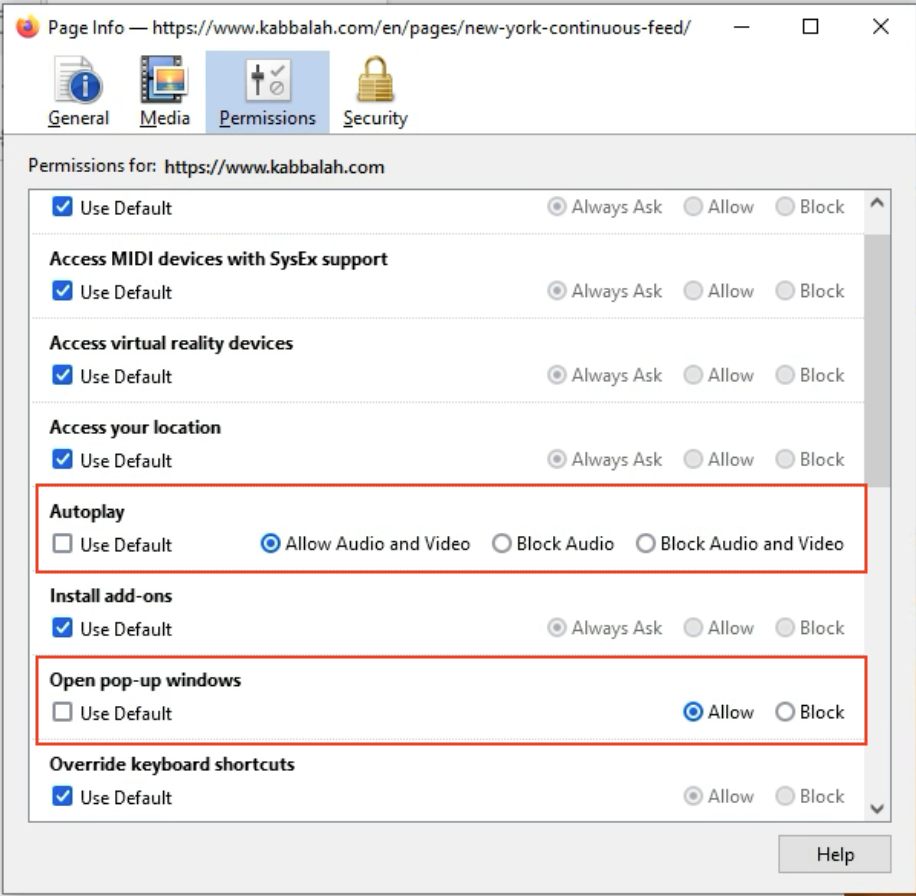
- In the pop-up that appears, select ‘Permissions’ and check off (See image below):
- Permissions > Autoplay > Uncheck "Use Default" > Check "Allow Audio and Video"
- Permissions > Open Pop-up Windows > Uncheck "Use Default" > Check "Allow"
To see more instructions on autoplay settings on Mozilla support pages, click here.
You’re set! Open the live-streaming page you wish to watch, and don’t forget to set your volume. Please be aware that entering full screen will prevent autoplay from working. To make your video player larger, you may use the Zoom option in Firefox’s menu under View > Zoom > Zoom In.
Note that these autoplay instructions will ONLY work on our Continuous Feed Pages, and will not work on the standard event live stream page. For autoplay to work as expected, make sure you are viewing the event from the Continuous Feed Pages below:
Have feedback? While we’ve found these instructions to work well for most users, occasional browser updates may alter these steps. If these instructions didn’t work for you, please reach out to the Customer Care team (care@kabbalah.com) so they can alert our technical team to assist you and update our instructions.